reversefs
A filesystem in reverse: serve ordinary directories as complete, byte-exact block devices in 14 on-disk formats — live, over USB, IDE, or the network. And the other way around: FUSE-mount, format, initialize, inspect and flash real console disks.
What is reversefs?
A normal filesystem driver reads a disk and shows you files. reversefs
does the opposite: it synthesizes a disk from your files, on the
fly. Point it at a directory, pick a format, and any consumer that speaks
"raw sectors" — a kernel driver, a game console, an emulator, QEMU,
dd — sees a perfectly ordinary disk.
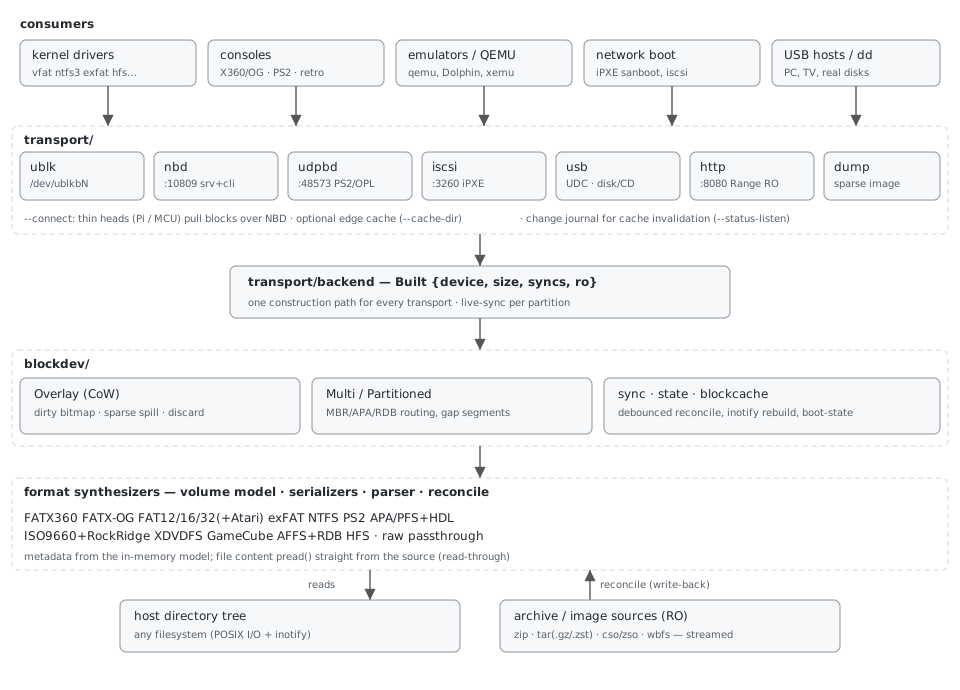
- Nothing is copied up front. Metadata (boot sectors, FATs, B-trees, checksums) is computed from an in-memory model; file content is read straight out of your directory on demand.
- Writes come back as files. Consumer writes land in a copy-on-write overlay; a reconcile pass parses the effective disk and converges your directory — create, update, delete. Live and bidirectional by default.
- Your data is guarded. Deletions are honored only for entries the consumer demonstrably saw; a half-written disk can never mass-delete your sources; read-only modes never touch the source at all.
Quick start
# build (rustc >= 1.87) — or grab a release binary (x86_64 / aarch64 / armv7)
cargo build --release
alias reversefs=./target/release/reversefs

# 1. a directory as a FAT32 disk image, ready to flash anywhere:
reversefs dump --fat32-part /data/stuff=8G --out disk.img

# 2. the same disk LIVE as /dev/ublkb0 (Linux >= 6.0, root):
sudo reversefs serve-ublk --fat32-part /data/stuff=8G --dev 0
sudo partprobe /dev/ublkb0 && sudo mount -t vfat -o utf8 /dev/ublkb0p1 /mnt

# 3. the same disk over the network, no root:
reversefs serve-nbd --fat32-part /data/stuff=8G --listen 0.0.0.0:10809

# 4. real-disk tools — what is on this disk / write an image safely:
reversefs inspect /dev/sdX
reversefs flash disk.img /dev/sdX

# teardown of #2; the cookbook and the FATX geometry helper:
sudo reversefs clean-ublk --dev 0
reversefs examples
reversefs info --size 200G
Choosing a mode
Every format works with every mode — pick by where the consumer is:
| You want… | Command | Pros | Cons |
|---|---|---|---|
a disk image file (to flash onto real media, archive, or inspect) |
dump |
works everywhere, no root, sparse output | a snapshot — source changes after the dump aren't in it |
| a local block device on this machine (mount it, partition it, benchmark it) | mount (ublk) |
fastest local path, full RW + live sync | Linux ≥ 6.0 with ublk_drv, root |
| the same, on a kernel too old for ublk | serve-nbd --attach |
nbd.ko is ancient and everywhere | root; slightly more moving parts |
| a disk over TCP (VMs, another Linux box, a thin head) | serve-nbd |
no root, multi-client, qemu speaks it natively | consumer needs an NBD client |
| a disk for a PS2 over the LAN | serve-udpbd |
OPL/Neutrino speak it natively — zero console setup | wired LAN only (UDP, no retransmissions) |
| network boot of real PCs (iPXE), ESXi/Windows initiators | serve-iscsi |
iPXE sanboot, standard ecosystem |
chattier protocol; one LUN, no auth |
| this box to BE a USB drive (plug into console/TV/PC) | serve-usb |
consumer needs nothing — it just sees a USB stick | needs a USB device controller (Pi Zero/4/5 OTG), root |
| a read-only export for MCUs / scripts / browsers | serve-http |
any HTTP client works; trivial firmware | read-only by nature |
| a thin head: sources on the NAS, this box only forwards | serve-usb --connect |
head needs no storage/config; NAS does the work | adds network latency to every miss |
dump to sanity-check the result (mount the image with
-o loop or open it in 7-Zip), then switch the same flags to a
live mode.Format cookbook
Recipes below assume the binary is on PATH. Every recipe
also works with --daemon (background), :ro /
--read-only (protect sources), and any transport from the
table above — only the most typical pairings are shown.
RW = consumer writes flow back to your
directory; RO = read-only medium, consumer
writes stay in a session overlay and vanish on restart.
Share a folder as FAT32 / FAT16 / FAT12 RW
The universal format: PCs, TVs, printers, cameras, microcontrollers, DOS. Up to 4 MBR partitions (one directory each); FAT12 makes floppy images with canonical geometry (360K…2880K) that real drives and Gotek emulators accept.
# USB-stick disk for a TV, from two folders:
sudo reversefs serve-ublk --fat32-part /data/movies=64G --fat32-part /data/music=16G --dev 0

# a DOS boot floppy image:
reversefs dump --fat12-disc /data/floppy=1440K --out boot.img

# game library for a console, write-protected:
reversefs serve-nbd --fat32-part /data/games=32G:ro --listen 0.0.0.0:10809
Limits: 4 GiB−1 per file (format limit; bigger files are
skipped with a warning). Mount with -o utf8 on Linux for
correct long names.
Share a folder as exFAT RW
The modern removable-media format — no 4 GiB file limit. Best choice for video collections, cameras, and anything made after ~2010.
sudo reversefs serve-ublk --exfat-part /data/video=128G --dev 0
sudo partprobe /dev/ublkb0 && sudo mount -t exfat /dev/ublkb0p1 /mnt
Share a folder as NTFS RW
Full NTFS 3.1 with write-back — Windows machines mount it natively, and PS3 homebrew (webMAN/multiMAN) reads NTFS USB disks.
reversefs serve-nbd --ntfs-part /data/share=64G --listen 0.0.0.0:10809
# on the consumer: any NBD client, or serve-usb on a Pi head
Serve a folder as a CD-ROM RO
ISO9660 with Joliet (long Unicode names for Windows) and Rock Ridge (case-sensitive names + POSIX permissions for Linux/macOS/retro Unixes). Optional El Torito boot for BIOS and UEFI.
# burnable/mountable .iso from a folder:
reversefs dump --iso9660-disc /data/cd --iso9660-label MY_CD --out cd.iso

# live virtual CD drive:
sudo reversefs serve-ublk --iso9660-disc /data/cd --size 700M --dev 0

# bootable hybrid (BIOS + UEFI):
reversefs dump --iso9660-disc /data/cd \
    --iso9660-boot isolinux.bin --iso9660-boot-efi espfat.img --out boot.iso
Serve games as an Xbox / Xbox 360 disc (XISO) RO
The XDVDFS format both Xboxes use on game discs (not ISO9660). Consumers: xemu, Cxbx-Reloaded, ODE boards, extract-xiso tooling. A retail 360 still needs ODE-class hardware to accept it.
reversefs dump --xdvdfs-disc /data/game --out game.iso
reversefs serve-nbd --xdvdfs-disc game-files.zip --listen 0.0.0.0:10809  # zip works too
Serve a GameCube game RO
Source = a game extracted with wit (the standard
sys/ + files/ layout). reversefs rebuilds the
disc: header, FST, aligned file data. Consumers: Dolphin, GC Loader,
Swiss.
wit extract game.iso /data/gcgame          # once, with Wiimms ISO Tools
reversefs dump --gc-disc /data/gcgame --out rebuilt.gcm
# edit files under /data/gcgame/files/ and re-dump — instant modding loop
Feed a real Xbox 360 (FATX360 HDD) RW
Big-endian XTAF, calibrated against real console disks —
a physical RGH3 console recognizes the result. Partition
keys: sc gc se1 se2 x1 x2 (x2 = games/Content).
# games only — simplest:
sudo reversefs serve-ublk --fatx360-part /data/x360=x2 --size 200G --dev 0

# full console-ready image: capture the security-sector prefix once from the
# console's own disk, bake it in, flash the result (size-checked + verified):
reversefs capture /dev/sdX --fatx360-template template.bin
reversefs dump --fatx360-disc /data/x360 --size <disk_size> \
    --fatx360-template template.bin --out disk.img
reversefs flash disk.img /dev/sdX
The security sector is RSA-signed per disk, so the template must come from
the disk the console originally used. capture is read-only,
runs detection first, and refuses to extract from a non-FATX disk
(override with --force). The template identifies
your hardware — share it only on purpose.
Without a template every fatx360 hd image carries an unsigned
HDDSS at 0x2000 (sector count + stock logo, no RSA — what a console writes
when it formats a disk itself). init -t fatx360 fills in the
target drive's real ATA serial, and
flash /dev/sdX --fatx360-hddss refreshes the block in place
after flashing an image. RGH consoles skip the signature check; stock
consoles demand the MS-signed original.
Beyond the retail hard disk, --fatx360-table selects the other
360 media: mu (memory unit), usb (USB storage — the
concatenation of the console's Xbox360/Data0000..NNNN files) and
kit (devkit disk with the xdv dashboard partition).
Feed an Xbox OG (FATX-OG HDD) RW
Little-endian FATX with an XBpartitioner table in sector 0, so modded BIOSes and tools see custom F/G partitions. Pairs naturally with a USB→IDE bridge head.
sudo reversefs serve-ublk --fatxog-disc /data/xboxog --size 40G --dev 0Feed a PlayStation 2 — files and GAMES RW
A full APA-partitioned PS2 disk: PFS partitions for files
(OPL/uLaunchELF read them) and HDL partitions for games —
each disc image becomes a partition OPL lists and boots. Combined with
serve-udpbd, a real PS2 boots games straight over the LAN,
and the images may even stay compressed:
reversefs serve-udpbd \
    --ps2-part /data/opl=+OPL=512M \
    --ps2-hdl "or2006.iso.zst=OutRun 2006" \
    --ps2-hdl "gt4.cso=GT4" \
    --size 120G --listen 0.0.0.0:48573
The boot file name is read from each disc's own SYSTEM.CNF; CD/DVD media type is set automatically. HDL partitions are RO; PFS partitions keep full write-back.
Feed an Amiga (AFFS, with a real partition table) RW
AmigaDOS FFS volumes: ADF floppy images, HDF hard files, and — with
--affs-rdb — a proper Rigid Disk Block
partition table, so a real Amiga (or WinUAE, or your USB→IDE bridge)
sees a bootable hard disk.
reversefs dump --affs-disc /data/amiga --size 1760K --out disk.adf   # HD floppy
sudo reversefs serve-ublk --affs-disc /data/amiga --size 200M --affs-rdb --dev 0  # partitioned HDD
Feed a classic Mac (HFS) RW
reversefs dump --hfs-disc /data/mac --size 32M --hfs-label MACDISK --out mac.imgSystem 6/7-era HFS (not HFS+); names ASCII ≤ 31 chars, period-correct.
Feed an Atari ST RW
One flag switches the FAT family to ST conventions: floppies get the TOS executable-boot checksum, hard disks get an AHDI root sector instead of a DOS MBR. PC tools still read the filesystems.
# TOS-bootable floppy (boot code + checksum 0x1234):
reversefs dump --fat12-disc /data/st=720K \
    --fat12-bootcode boot.st --atari --out floppy.st
# AHDI-partitioned hard disk:
reversefs dump --fat16-part /data/st=20M --atari --out hd.img
Serve an existing image — including Wii RO
--raw-disc is the passthrough mode: an existing disk or
disc image served byte-exact with a session overlay, over any transport.
The image may be compressed — decompressed on the fly, never unpacked to
disk:
reversefs serve-nbd --raw-disc disk.img.zst --listen 0.0.0.0:10809
reversefs serve-nbd --raw-disc game.wbfs    --listen 0.0.0.0:10809  # Wii, from a WBFS container
reversefs dump      --raw-disc game.cso --out game.iso              # doubles as a converter
Write semantics: default = session overlay (image pristine, writes gone
on restart); --raw-writable writes into the plain image file
(qemu-nbd style — an OS-install target disk); --raw-overlay FILE
keeps the image pristine and persists writes in a side file (compressed
bases work too; delete the pair for a factory reset).
Accepted containers: plain files, .zst
(seekable or plain), .gz, .cso/.zso,
.wbfs, and zip/tar holding exactly one image. Wii discs are
AES-encrypted with hash trees on-disc — passthrough of an existing image is
the correct (and only sensible) approach; GameCube has no encryption, hence
its full synthesizer above.
Archive sources — serve without unpacking
Anywhere a source directory is accepted, you may pass an
archive file instead: --iso9660-disc game.zip,
--fat32-part games.zip=8G, --fatx360-part games.zip=x2.
It is indexed once and streamed on demand — never extracted to disk — and
the partition is forced read-only (the archive is never modified).
| Container | Random access strategy |
|---|---|
| ZIP, stored | direct pread of the member's bytes |
| ZIP, deflate | live inflate cursor per entry + decompressor-state checkpoints (~44 KiB each 8 MiB) — backward seeks resume from the nearest checkpoint; RAM-bounded, no disk spill |
| TAR | direct pread (members are contiguous) |
| tar.gz / .gz | same deflate cursor + checkpoints |
| tar.zst / .zst (seekable format) | frame table → one frame per read + small LRU cache |
| tar.zst / .zst (plain stream) | restartable sequential cursor (a warning suggests the seekable format for big sources) |
| CSO/ZSO, WBFS | native block/frame index of the format |
# a zipped game library, straight to a console, still compressed on the NAS:
sudo reversefs serve-ublk --fat32-part /nas/games.zip=32G --dev 0
Transport guide — which client where
AoE (serve-aoe): raw layer-2 ATA-over-Ethernet —
no IP/TCP, the simplest consumer side (FPGA/MCU heads); Linux initiator
aoe.ko (/dev/etherd/eN.M), iPXE
sanboot aoe:eN.M; same L2 segment only.
All transports serve the same built device; they differ in who the consumer is and which side does the heavy lifting.
| Transport | Consumer | Root? | Notes |
|---|---|---|---|
dump | anything that reads files | no | sparse snapshot image |
mount (ublk) | this machine's kernel | yes | Linux ≥ 6.0; fastest local RW path |
serve-nbd | any NBD client (qemu, nbd.ko, busybox, your firmware) | no | multi-connection; advertises the read-only flag for RO media |
serve-nbd --attach | this machine's kernel via nbd.ko | yes | local /dev/nbdX without ublk |
serve-udpbd | PS2 (OPL/Neutrino) | no | wired LAN only — UDP has no retransmissions |
serve-iscsi | iPXE, ESXi, Windows/Linux initiators | no | RFC 7143 subset, one LUN, no CHAP |
serve-usb | whatever the cable plugs into | yes | needs a UDC; three backings, see below |
serve-http | curl, browsers, MCU HTTP clients | no | GET/HEAD + Range on /disk.img; read-only |
serve-usb backings
| Backing | Data path | Use when |
|---|---|---|
nbd (default) | kernel nbd client → f_mass_storage | normal case — kernel readahead & merging for free |
ublk | /dev/ublkbN → f_mass_storage | kernel ≥ 6.0 and you already use ublk |
ffs | our own SCSI/BOT in userspace → USB endpoints | kernels without nbd.ko/ublk; no block device anywhere in the path |
--usb-cdrom presents the LUN as a USB
CD/DVD-ROM drive: hosts see an optical drive and BIOSes boot it via
El Torito — plug a Pi with --raw-disc installer.iso
--usb-cdrom into any machine that boots from USB optical media and
install an OS without burning a disc. Implies read-only; works with every
backing (kernel MMC for nbd/ublk, our own MMC
subset — READ TOC, GET CONFIGURATION, event polling — for
ffs).
NAS + edge heads — remote consumers
The synthesis brain and the physical connector don't have to share a box. Run reversefs on the NAS as the block server; put a small head next to the console:
# NAS — holds sources (even compressed), does all filesystem work:
reversefs serve-nbd --ps2-hdl "gt4.cso=GT4" --size 120G --listen 0.0.0.0:10809

# Pi Zero 2 W plugged into the console's USB port — a THIN HEAD:
sudo reversefs serve-usb --connect nbd://nas:10809
--connect skips the local build: no sources, no layout
flags, no storage on the head. Which NBD client carries the data depends
on the backing — the rule: the kernel client whenever the kernel
consumes the blocks; our userspace client only where no block device
exists in the path:
| Scenario | NBD client | Why |
|---|---|---|
--connect + backing nbd |
kernel, attached straight to the NAS | kernel readahead/merging work against the network; best throughput |
--connect + backing ffs |
userspace (built-in) | no nbd.ko needed; NAS → socket → USB endpoint, zero kernel block devices |
| MCU head (ESP32 firmware) | your own (~200 lines on lwIP) | TCP gives retransmissions on WiFi; requests are fixed 28-byte frames; the server accepts minimal clients (EXPORT_NAME, zero flags) and its read-only flag lets firmware skip the write path entirely |
Edge cache (--cache-dir DIR --cache-size N,
ffs/ublk backings): the head keeps fetched blocks in a local shadow file
(SD/NVMe, or tmpfs for RAM), so the game you are playing streams locally
after the first run. Freshness is journal-driven: the NAS adds
--status-listen :10810 (optionally --status-state
FILE to survive restarts); every content change bumps a generation
with its byte ranges and the head invalidates only those ranges —
adding a game to a 16 TB library does not re-download the 2 TB you cached.
Chunk-aligned 1 MiB writes keep SD wear minimal; LRU eviction punches
holes. Foreign NBD servers get no persistent cache unless you declare
--cache-immutable.
| Head | Realistic ceiling | Good for |
|---|---|---|
| ESP32 (WiFi) + RP2040 (Full-Speed USB / PIO-IDE) | ~1 MB/s | PS1, floppies, Amiga, Atari, DOS — the whole CD era and older |
| Pi Zero 2 W (WiFi, USB2 UDC) | ~5–10 MB/s | PS2, GameCube, most USB consumers |
| Pi 4/5 (Ethernet, USB2/3 UDC) | 30–100+ MB/s | everything, incl. DVD-era streaming |
Mounting real disks (reversefs mount)
The other direction: FUSE-mount partitions of existing disks and images.
The mounting layer is format-agnostic (one backend per format); currently
mountable: FATX/XTAF — both Xbox consoles, variant
auto-detected from the superblock magic. -t/--type is the
partition table type (like mount -t): file,
fatx360, fatxog, mu,
usb, kit.
reversefs mount --list /dev/sdX            # what is mountable and how
reversefs mount --all /dev/sdX /mnt/xbox   # every partition: /mnt/xbox/<key>/
reversefs mount -t fatx360 -p x2 /dev/sdX /mnt/p
reversefs mount -t fatxog  -p c  /dev/sdX /mnt/p
reversefs mount -r image.fatx /mnt/p       # read-only, bare image
Consistency by construction: a single allocation path fails with
ENOSPC before mutating anything, free space always derives
from the FAT (df can never go negative), writes are
write-through, fresh clusters are zeroed.
Formatting & initializing (mkfs / init)
reversefs mkfs -p x1 /dev/sdX                 # one partition, retail cluster sizes
reversefs init -t fatx360 --fatx360-template hddss.bin /dev/sdX   # whole console disk
reversefs init -t fatxog /dev/sdX             # Xbox OG + XBpartitioner table
init erases foreign partition tables first — the first MiB
(MBR + primary GPT) and the last MiB (the backup GPT lives at the
disk end). Both commands are destructive and ask for confirmation
(--yes when scripting). Judged by the independent C++
fusefatx/fsck.fatx (360) and mborgerson fatxfs (OG).
Inspecting, capturing & flashing (inspect / capture / flash)
reversefs inspect /dev/sdX                    # unified view: tables, partitions,
                                              # hidden regions, verdict — read-only
reversefs capture /dev/sdX --fatx360-template t.bin   # extract the fatx360 template
reversefs capture /dev/sdX --boot-mbr m.bin --boot-gap g.bin  # GRUB from a real disk
reversefs flash disk.img /dev/sdX             # size-checked write + verify
reversefs flash /dev/sdX --boot-mbr m.bin     # patch one region, touch nothing else
inspect merges every partition table (MBR, GPT,
XBpartitioner, the fixed Xbox layouts) into one partition list and
recognizes foreign filesystems (ext2/3/4, LUKS, LVM2, swap, btrfs, XFS,
squashfs, md-RAID) info-only. capture flags reuse the
synthesis vocabulary — what it extracts is exactly what
dump injects and flash patches back. Where
inspect answers “what is on this disk?”,
mount --list answers “what can I mount and how?”.
Operations: background, read-only, live sync
- Background: every serving command takes
--daemon,--pid-file FILE,--log-file FILE. Stop withkill $(cat FILE)— SIGTERM/SIGINT run a final reconcile, so consumer writes are never lost. - Fleet mode:
reversefs up fleet.yamlserves many disks from one YAML file — one child process per disk, per-disk restart policies (always/on-failure/never), adefaults:section merged under every disk and amounts:section that FUSE-mounts devices once they appear (unmounted before the disks stop). YAML keys are CLI flag names verbatim;--checkprints the child command lines,up --examplea starter config. Headless boxes:up --daemon, thenreversefs down fleet.yamlstops the whole fleet through its pid file (/run/reversefs.pidas root;pid-file:per fleet). The thin-head NBD client reconnects by itself after network blips. - Read-only sources: append
:roto any part spec or pass--read-only. The consumer still mounts RW and never sees I/O errors — its writes live in a session overlay and vanish on restart; your directory is never modified. - Live sync: on by default (
--sync-debounce-ms, 0 disables). Consumer writes reconcile to your directory after they quiesce; source-side edits rebuild the served disk with stable allocation, so a mounted consumer stays coherent. Editing a served archive rebuilds too.
Booting
Boot material is supplied as files and injected identically in every
mode: --boot-mbr (x86 MBR code), --boot-gap,
--boot-active, --boot-esp (UEFI System
Partition type), --fat12-bootcode (floppy boot sector merge),
--affs-bootblock (Amiga, checksum recomputed),
--iso9660-boot/--iso9660-boot-efi (El Torito),
--atari (TOS checksum / AHDI). --boot-state DIR
persists sectors written by consumer-side installers across restarts.
Verified end-to-end in QEMU (SeaBIOS + OVMF), from disk and from CD.
Limitations worth knowing
- A mounted consumer caches disk structures; source-side changes are visible on the device instantly but the consumer may need a remount to notice (inherent to emulating a disk).
- Format ceilings: 4 GiB−1 files on FAT/ISO/XISO/GC; FATX names mangle to 42 chars; HFS names ASCII ≤ 31.
- Wii content cannot be modified in flight (AES + hash trees) — use raw passthrough of existing images.
- ublk on Ubuntu/Mint kernel 6.17.0-35 is broken (LP #2154635) — boot
6.14.x or use
serve-nbd --attach.
How it's verified
Every format was built against an oracle (a reference image from the ecosystem's own formatter) and is continuously verified by independent judges — real drivers, fscks and scene tools:
| Format | Judges |
|---|---|
| FATX360 | unmodified fusefatx, fsck.fatx, a physical RGH3 Xbox 360 |
| FATX-OG | mborgerson fatxfs, reversefs mount (in-tree consumer check) |
| FAT32/16/12 | kernel vfat, fsck.fat, mtools, file(1) |
| exFAT | kernel exfat, fsck.exfat, exfat-fuse |
| NTFS | ntfs-3g (ro + rw), kernel ntfs3 |
| ISO9660 | kernel isofs, isoinfo (incl. -R Rock Ridge), 7z, QEMU SeaBIOS/OVMF |
| XDVDFS | extract-xiso: list + extraction round-trip |
| GameCube / WBFS | wit (Wiimms ISO Tools): list + extraction; WBFS readback equals wit's own conversion |
| Amiga FFS / RDB | xdftool, kernel affs, rdbtool (table parse + export) |
| HFS | hfsutils (read + write), kernel hfs |
| PS2 APA/PFS / HDL | pfsshell; hdl_dump (TOC, game list, byte-exact extraction) |
| Atari ST | mtools at the AHDI offset, checksum/table bytes pinned in tests |
| Transports | qemu (NBD + libiscsi), busybox nbd-client path, curl (HTTP ranges), real PS2 protocol frames (UDPBD) |
≈150 automated tests plus a root live-test script
(scripts/live-test.sh) exercising real kernel mounts over
ublk. The complete reference (incl. format internals) lives in the
repository README.md — Polish version:
README.pl.md; MCU client blueprint:
esp32-nbd-client.md.